728x90

[Python] Xcode를 사용하지 않고 맥(macOS)에서 동작하는 애플리케이션 개발 방법 - Python 표준라이브러리 tkinter 사용
Xcode를 사용하지 않고 간단하게 맥(macOS)에서 실행되는 애플리케이션을 개발하는 방법을 알아보겠습니다.
여러가지 방법이 있는데
이번에는 Python 프로그래밍 언어를 통해서 맥 애플리케이션을 개발하도록 하겠습니다.
간단한 창이 실행되면서 Hello, World!를 출력하는 프로그램입니다.
아래의 코드를 helloTkinter.py 파일로 만듭니다.
# hello_world_mac.py
import tkinter as tk
root = tk.Tk()
root.title("Hello World")
root.geometry("420x220")
label = tk.Label(root, text="Hello, World!", font=("Helvetica", 32, "bold"))
label.pack(expand=True)
root.mainloop()
터미널 프로그램을 실행한다음
아래의 명령어로 실행합니다
python3 helloTkinter.py
정상적으로 실행이 된다면 다음의 화면이 출력되는것을 확인할 수 있습니다.

tkinter 라이브러리가 설치가 되어 있지 않으면 아래와 같은 에러가 발생합니다.
Traceback (most recent call last):
File "/Users/sansamlife/Desktop/Code/Python/SimpleDesktopApplication/helloTkinter.py", line 2, in <module>
import tkinter as tk
File "/opt/homebrew/Cellar/python@3.11/3.11.6_1/Frameworks/Python.framework/Versions/3.11/lib/python3.11/tkinter/__init__.py", line 38, in <module>
import _tkinter # If this fails your Python may not be configured for Tk
^^^^^^^^^^^^^^^
ModuleNotFoundError: No module named '_tkinter'
아래의 명령어를 실행해서 tkinter를 설치해주세요
brew install python-tk
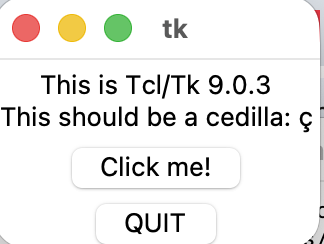
설치가 잘되었다면 아래의 명령어를 통해서 창이 잘 뜨는지를 확인할 수 있습니다.
python3 -m tkinter
'소프트웨어 개발 > 프로그래밍 언어' 카테고리의 다른 글
| [Swift] Xcode를 사용하지 않고 맥(macOS)에서 동작하는 애플리케이션 개발 방법 (0) | 2026.02.28 |
|---|---|
| [프로그래밍 언어] 새로운 프로그래밍 언어 배우기 두번째 이야기 'Odin, Carbon, Zig, D' (0) | 2025.02.19 |
| [프로그래밍 언어] 새로운 프로그래밍 언어 배우기 'Crystal, Julia, Nim' (2) | 2025.02.15 |
| [C/Mac OS] simpleApp.c:1:10: fatal error: 'gtk/gtk.h' file not found#include <gtk/gtk.h> (0) | 2023.12.09 |
| [Haxe] M1, M2 맥북에 Haxe 프로그래밍 언어 설치하기 (0) | 2023.09.23 |